• Home
Blue Orange Green Pink Purple

featured-content

Showing posts with label Chrome Tricks. Show all posts

5 Super Extensions to Decorate New Tabs in Chrome..........


Are you the type of person who loves to customize things? Do you want to be different than the crowd? Do you want to experiment new ways to improve productivity? If your answer is yes, then here is something for you. We will have a look at 5 beautiful chrome extensions that changes the way your new tab looks. Not only the looks, these extensions gives you better functionality and features for the work you like to do most.

Access Bookmarks and Closed Tabs Easily with Incredible Start Page

incredible-startpage
Incredible StartPage is a featured chrome extension which claims to give you a productive start. It makes accessing bookmarks and closed tabs very easy by putting them in a beautiful list at the center of the page. You can also write notes in the new tab and post them directly to Gmail. If you are a bookmark person and keep using closed tabs frequently then use this handsome extension from here.

Customize New Tab with Predefined Sites by SpeedDial

speed-dial
Normally, Chrome shows you most visited sites on opening a new tab. You can change this behavior, in fact make is better and attractive by SpeedDial. With this extension, you can predefine your tab sites instead of most visited one when opening new tab. You can also change tab background image, number of blocks and use site logos. This is the best extension to beautify chrome.

Keep Track of Time with Modest Digital Clock

clock extension
If you like to follow time, then this clock extension will help you with your punctuality. It is simple and minimalist but yet very useful. It de-clutters the new tab with the most precious thing.

Get Google Tasks on New Tab

new-tab-to-tasks
This simple extension helps you to be more productive. Remember Google Task? It is a simple to-do list available in Google calendar and Gmail. Now you can use it more effectively and frequently with this extension. The new tab will now display all your tasks with this extension. And you can easily add new or delete old ones with its intuitive interface. The developer hopes that with this, we will see more and do them more often.

Set Beautiful Flickr Pics as New Tab backgrounds

visivotab-screenshot
The last extension in the series to beautify your new tab is VisivoTab. This one gets hand selected pictures from Flickr’s visivo and sets it as a tab background. Idle for artistic people with fast internet connection.
If you observe carefully, opening new tab is the most frequent thing we do on Google Chrome. With the above 5 ways we can change its behavior and layout and hopefully make this activity more useful.
........................................................................................................................
Read More 0 comments | edit post

Cannot Install or Update Chrome ? --- Error, Corrupt or Failed Installation


Sometimes it’s not easy install Google Chrome error free. There are various problems like corrupt installed file (exe) or failed operation at last step of installation. Chrome wont install or gives trouble in updating due to many reasons primary due to network failure, Internet connection and corrupt installation.
These Chrome updating or installation problems often arises when you download installer in temp directory, but then these files get deleted by OS. To solve these problems, follow the below steps:
For Google Chrome Fresh Installation:
1) First of all, remove the previous version of Chrome by Add/Remove Programs in Control Panel for windows XP or Programs and Features in Windows Vista.
2) Manually delete some leftover files of Chrome from the following locations:
XP – C:\Documents and Settings\[username]\Application Data\Google\Chrome\
Vista – C:\Users\[username]\AppData\Local\Google\Chrome\Application\
3) Now get a fresh install from Chrome Official site or download the dot(.)exe installation file from here.
chrome-error-install-corrupt
For Updating Previous versions of Google Chrome:
1) Download the portable chrome from here and unzip it in any folder. Now find the file Chrome_Update.exe in the locations told above in step 2 and replace it with the one you have unzipped.
2) Run Chrome_Update.exe from system folder to update Chrome to latest version.That should solve error in updating chrome.
.....................................................................................................................
Read More 0 comments | edit post

Google Makes Chrome Extensions For Public


As anticipated, Google has launched its extension gallery for Windows Chrome users and as an early Christmas gift, it has also released Chrome for Mac and Linux users.
We have already informed you that Chrome extensions might go public by Google this week and yes, it did. In all, there are 435 extensions though you might not find complex and multi-utility extensions like there counterpart addons in Firefox. These extensions are lightweight ( it means they won’t slow down your chrome browser) and typically get installed near the address bar.
chrome-xtensions
To install Chrome extensions, you must have latest beta version of Chrome. You can download it from here.
Some of the highly recommended extensions are:
AdThwart – Works like Adblock plus addon for Google. This extension will hide all the annoying ads from the web page. Note that the ads are hidden, not removed. You can remove ads from chrome by this trick.
Gmail Checker – Displays number of unread messages from your Gmail inbox.
Google Translate – Lets you translate any web page with a click of button. It uses Google translate engine to convert text, websites, blogs and documents.
VerticalTabs – If you have a habit of opening too many tabs at same time, then this extension is specifically made for you. Along with smaller tabs of Chrome (which are terrible to read), this extension will display all tabs in vertical fashion with full titles.
IE tab – For websites that doesn’t function properly in chrome, use this extension that will use IE engine but renders it in Chrome.


Facebook – No need to open facebook in a separate tab. This extension lets you check your wall, your feed and notifications from a small pop-up.
One number – Too many add-ons but less space? This nifty extension lets you save space by providing single button for Gmail, Greader, Gwave and GVoice.
RSS Subscription – Subscribe to feeds by clicking on RSS icon in address box (omnibox) just like in Firefox.
We will be soon publishing the list of most useful extensions. Until then, enjoy and experiment with Chrome extensions from here.
[Image source]
Read More 0 comments | edit post

Hotmail Login Problem and Other Errors in Google Chrome : Different Here


When the Google Chrome first came up and at same time Hotmail Live changed its code, many of us faced “Upgrade your Browser” error. However, clicking on “Continue to Windows Live Hotmail” solved the problem temporary.

windows-chrome-war
New versions of Google Chrome solved this problem but recently Hotmail has started showing up “Error on page” refusing to open or send new mails. This is not a particular Hotmail problem, many other websites have showing such errors lately. Google Chrome is a new browser and still understanding the behaviour of numerous websites. There are still some incompatibility issues, which can be easily solved by following methods:
  • First, you must have latest version of Google Chrome. Download it from here.


  • A sure shot solution:
    1) Click on Wrench menu icon near the address bar.
    2) Select “Clear browsing data” from dropdown. Or press “Ctrl + Shift + Del”Chrome Keyboard Shortcut.
    3) Select checkboxes “Delete cookies” and “Empty the cache”. Also, select “Everything” from the period dropdown.Finally to remove all history click on “Clear browsing data” button.
  • Another alternate fix is to right click on the Chrome icon, go to properties and adding the following line to target field :
    - -user-agent=”Mozilla/5.0 (Windows; U; Windows NT 5.1; en-US) AppleWebKit/525.19 (KHTML, like Gecko) Version/3.1 Safari/525.19″
This hack will make Hotmail believe that the request is coming from Mozilla agent and will not force you to change internet browser.
...............................................................................................................................
Read More 0 comments | edit post

Top 5 Users Submitted beautiful Videos for Google Chrome Icon Project


If you remember, approximately 2 months ago Google Chrome team has invited usersaround the world to submit creative and innovative videos for Google Chrome Icon.

The entries are still in and people have come up with really funny and witty ideas. Following are the top 5 user submitted videos for Google chrome Icon contest based on user ratings, views and popularity:
1. Google Chrome Icon Made From Dominos –
2. Google Chrome Bento Box -
3. Google Chrome Stop motion lego -


4. Google Chrome Animated -
5. Google Chrome Transformer Style -
You can view all submitted entries by users here.
..........................................................................................................................
Read More 0 comments | edit post

Search Inside Websites With Chrome Address Bar (Omnibox) and Save Your Time


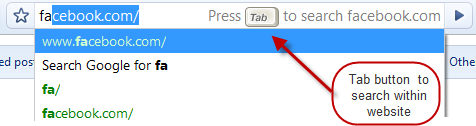
Everyone knows that Google Chrome Address bar AKA omnibox can also be used as search box. That is type your query term and simply hit enter to search in Google. Anew feature will let you search inside websites by hitting tab button.

This functionality gives quick search inside websites that you have previously visited. This is same as site: operator which restrict search the pages of a specific site. [View list of search query options]. It is a useful feature if you already knew where to find right results or you have already visited it but forgot its location. For example, a YouTube video or Facebook profile.


search-within


This shortcut to save time for searching within a site


To use this handy feature, all you need to do is to start typing name of website in omnibox. After few letters, website name would automatically come up and then you need to press tab button to search inside that website. Now you can search inside that website for anything.This functionality doesn’t work for all websites as of now like Microsoft but expected to fix this soon in near future.
This shortcut will save time for searching without actually going to that site first.
...................................................................................................................................
Read More 0 comments | edit post

How to Remove Websites from Chrome Homepage Tabs...............


Recently, when we covered 5 tab extensions to fancify chrome some readers mailed me, asking how to open blank tabs for privacy concerns? That is, they wanted to remove or hide most visited or recently closed websites from chrome’s new tab page.
Normally, when we open new tab in Google chrome, home page speed dial similar to opera displays most visited sites. Under normal circumstances, this is pretty useful as it provides facility to go to our favorite site with a single click. But sometimes, this is not at all favourable, especially when you want to hide your activities. At office or in home there are some situations when you don’t want to publicly display your recent visits for privacy reasons.
Possible solutions for this problem include - using incognito mode or removing website thumbnail from list. But this isn’t permanent solution for this recurring problem. Let’s discuss 2 potential solutions for this:

Temporary Hide Frequently Top Visited Web Pages

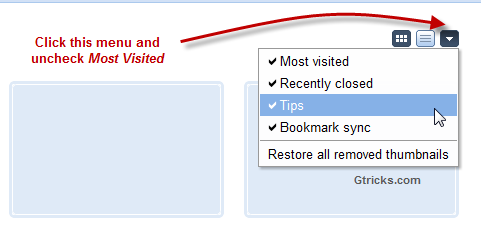
This one is simple, infact inbuilt in Chrome so you don’t have to download anything. All you need to do is click on Change Page Layout button and uncheck most visited and recently closed sites. Check out below image for instructions.

Permanently hide Thumbnails from New Tab

You can remove site thumbnails/images from chrome new page by clearing all your history. For this go to Options > Under the hood > Clear browsing data. Now to permanently stop these thumbnails from coming back, install Blank New TabExtension. This extension forces chrome to open about:blank in new tab i.e. blank page.
Now you can easily hide all those commonly visiting sites by above two methods. Here is a short video for the same:
Read More 0 comments | edit post
Older Posts Home

i am THE GOOGLE

interesting information, hacking tricks and tips for THE GOOGLE.

i am THE GOOGLE

  • About
      interesting information, hacking tricks and tips for THE GOOGLE.
  • Sites

    • Graphic Designo

    category

    • Chrome Tricks (7)
    • GMail Tricks (2)
    • Google interesting information (5)
    • Google Tips (1)
    • Google Tricks (14)

    Blog Archive

    • August (17)
    • July (13)
  • Search


    • Home

    © Copyright i am THE GOOGLE. All rights reserved.
    powered by I AM HACKING | Bloggerized by iamhacking.blogspot.com
    brought to you by I AM

    Back to Top